How to Check KPSEA Results
Getting your KPSEA Exams results is now easy and can be done online. Follow the simple steps below.
For parents and candidates:
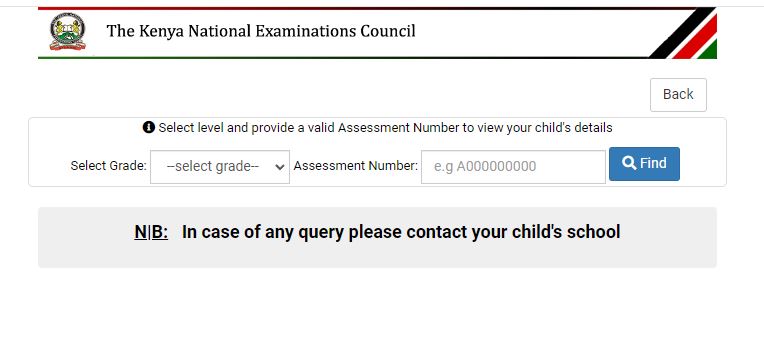
1. Visit: cba.knec.ac.ke/Parent
2. input your child’s grade and Assessment number.
3. Your kid’s results will be listed promptly.
For school heads:
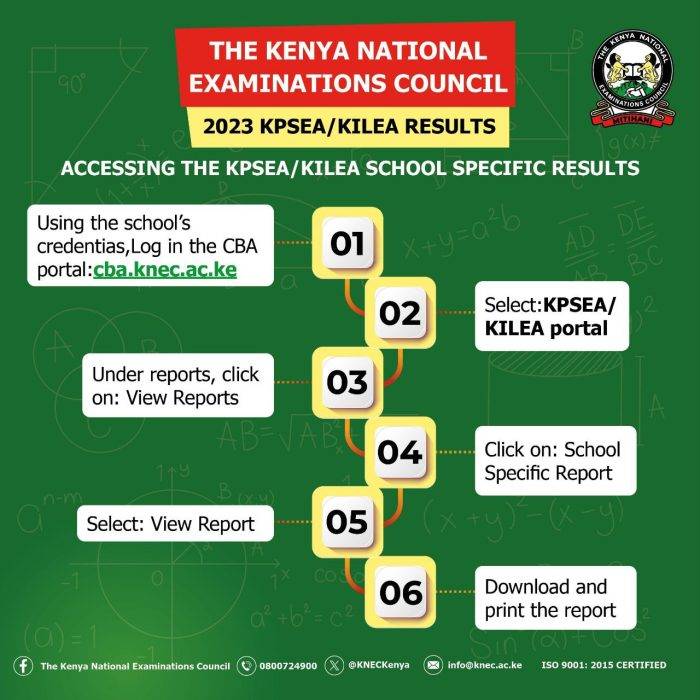
1. Visit: https://cba.knec.ac.ke/ , then log in with your credentials.
2. The username is the school’s KNEC code.
3. The password is assessment number.
The results will also be available in printed form at every institution.
KNEC reported that the results would be presented in a report format and made available on the school portal.
The KPSEA results are categorized into three types: individual, school-specific, and national reports, with the latter intended to provide insights for educational improvements.